Best way to organise clients as a dog walker
•Reading time: 8 minutes
Keeping track of pet details, client notes, addresses, and schedules is essential for any dog walking business. Without a system, information gets lost and mistakes happen. This guide explains simple ways to organise clients so you always have the details you need.

Why organisation matters for dog walkers
When you first start out, it's easy to rely on memory or scattered notes. But as your client list grows, disorganisation quickly turns into missed walks, forgotten instructions, or incorrect invoices. A clear system helps you:
- Keep every pet's information accessible
- Avoid scheduling conflicts
- Provide a professional experience
- Save time on admin
- Reduce stress
Professional dog walkers aren't just good with dogs - they're good at managing information.
Store all client details in one place
The biggest mistake new walkers make is storing information in multiple places - messages, notebooks, screenshots, and emails. Instead, create a single source of truth for every client.
Each client record should include:
- Name and contact information
- Pet name, breed, and age
- Behaviour notes
- Medical conditions
- Vet contact details
- Access instructions
- Emergency contact
When everything lives in one organised profile, you never have to search for information while standing outside someone's house.
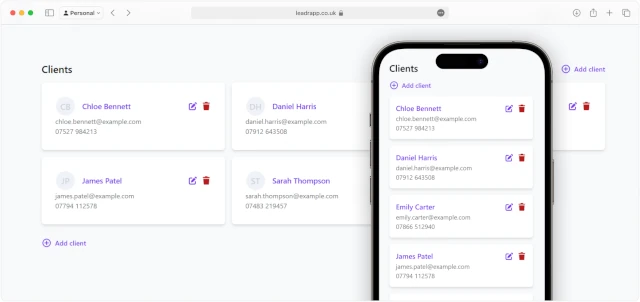
See how Leadr's client management tools help keep everything in one place.
Standardise your intake process
Consistency is key when you manage dog walking clients. Every new client should go through the same onboarding steps.
Create a standard intake checklist:
- Collect contact details
- Record pet information
- Confirm service type and frequency
- Agree pricing and payment terms
- Set start date
- Store house access instructions
Using a repeatable process ensures nothing gets missed and makes your business look professional from the start.
Use clear client notes (not just memory)
Notes should be short, structured, and easy to scan. Avoid long paragraphs and use bullet-style formatting.
Good note example:
- Nervous around bikes
- Prefers quiet routes
- Allergic to chicken treats
Bad note example:
"Sometimes gets a bit weird when there are bikes and might bark if they go too fast"
Clear notes save time and prevent mistakes when you're rushing between bookings.
Keep all your pet information organised and easy to access.
Organise clients by schedule type
Grouping clients based on booking type makes planning your week far easier. You can categorise clients into:
- Regular weekly walks
- Ad-hoc bookings
- Holiday clients
- Trial customers
When you separate them this way, you instantly know which clients need priority scheduling and which ones are flexible.
Leadr's booking management system helps you organise schedules efficiently.

Keep addresses and access information easy to find
Nothing slows you down like scrolling through old messages to find a lockbox code or address. Always store access details alongside client profiles so they're instantly available.
Best practice:
- Never store access instructions in chat threads
- Keep them inside your client system
- Double-check details before first visit
This prevents delays and avoids awkward situations where you can't enter a property.
Track payments and pricing per client
Organisation isn't just about pets - it's also about finances. Each client should have a clear record showing:
- Service type
- Agreed price and payment terms
- Payment status
- Outstanding invoices
When payment information is linked to a client you can quickly see who owes what.
Review client profiles regularly
Client information changes more often than you think. Dogs age, routines shift, and contact numbers get updated. Set a reminder every few months to confirm details with owners.
Quick review checklist:
- Phone number still correct
- Access instructions unchanged
- Pet health updates
- Vaccination records up to date
- Vet details correct
- Emergency contact valid
Regular updates keep your records accurate and prevent problems during visits.
Use tools instead of spreadsheets
Spreadsheets can work early on, but they become difficult to manage once your business grows. Dedicated systems designed for pet care businesses make it easier to manage dog walking clients because everything is structured automatically.
The right tool should let you:
- Store client profiles
- Attach pet notes
- Schedule bookings
- Track payments
If your current setup requires lots of manual editing, it's a sign you've outgrown it.
Common organisation mistakes to avoid
Many dog walkers struggle with admin not because it's hard, but because they build systems reactively instead of intentionally.
Avoid these common pitfalls:
- Relying on memory
- Saving information in chat apps
- Mixing personal and client calendars
- Forgetting to update notes
- Tracking payments separately from clients
Fixing these early makes scaling your business far easier later.
Use software designed for dog walkers
Spreadsheets and scattered notes might work when you have a handful of clients, but they quickly become hard to manage as your business grows. Purpose-built tools like Leadr are designed specifically to manage dog walking clients in one place, so you don't have to build your own system from scratch.
Instead of juggling documents and messages, you can:
- Store full client profiles
- Save pet details and notes
- Manage bookings and schedules
- Track services and pricing
- Update information instantly
Using dedicated software keeps everything structured automatically, reduces mistakes, and makes your business look more professional. It also saves hours each week on admin, which means more time walking dogs - and less time searching for information.
Final thoughts
The best way to manage dog walking clients isn't about complicated software or rigid processes - it's about consistency. When every client has a clear profile, every booking has a record, and every detail has a place, your business becomes easier to run and more professional to clients.
Organisation doesn't just save time. It builds trust, reduces mistakes, and gives you the confidence to grow your dog walking business knowing everything is under control.
Get your clients organised without the admin headache
Stop juggling notes, messages, and spreadsheets. Use one simple system to manage clients, pets, bookings, and payments - all in one place.
Start organising for freeGet more tips in your inbox
Subscribe to our newsletter for practical guides and advice to help you grow your dog walking business.
Related posts
08 October 2026
How dog walkers can manage bookings without stress
Learn how to manage dog walking bookings, clients, pets and invoicing with a simple process designed to reduce admin and keep your business organised.
26 June 2026
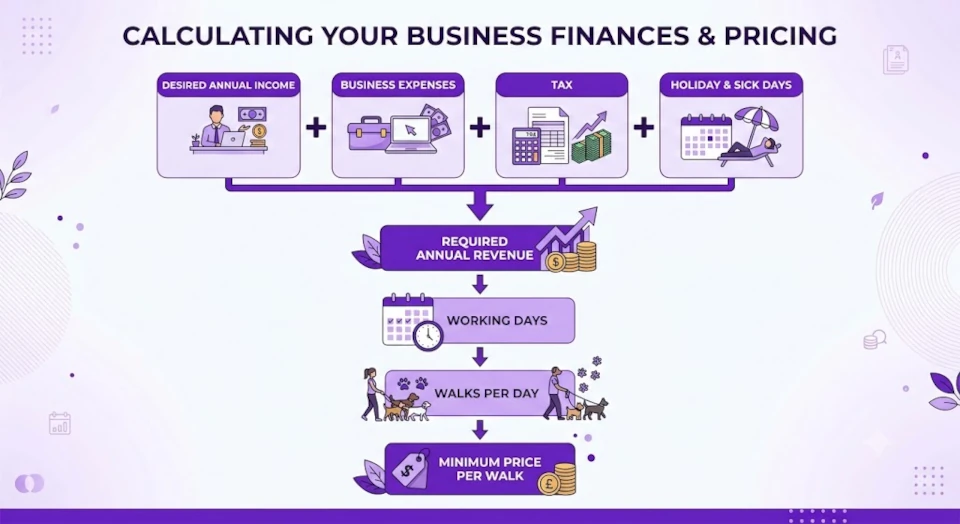
Dog walking pricing guide: How much should you charge?
Not sure what to charge for dog walking? Learn how to calculate profitable rates, cover your costs, avoid common pricing mistakes, and attract the right clients for your business.
22 May 2026
Calendars vs spreadsheets vs apps: What's best for managing dog walks?
Compare paper diaries, spreadsheets, calendars, and dog walking software to discover the best way to manage bookings, schedules, clients, and admin as your business grows.