
Running a dog walking business means juggling a lot: clients, pets, bookings, and everything in between. The idea of adding a website on top of all that can sound like a big project - one you'll “get around to someday.”
Here's the thing: setting up a website in 2025 is easier, faster, and cheaper than ever before. You don't need to hire a developer, know how to code, or spend a fortune. In fact, you can have a clean, professional dog walking site up and running in less than an hour - even if you've never built one before.
This guide will walk you through it step-by-step.
Step 1: Decide what you want your website to do
Before you dive into templates and colours, spend a bit of time deciding what you actually need your site to do. Going into it with a plan will make it quicker and less stressful. For most dog walkers, that's usually:
- Introduce who you are, your business and where you work
- List your services and pricing
- Show happy client testimonials or photos
- Give people a way to contact or book you
Keep it simple. You can always expand on it later - but even a single-page website that covers the basics is better than nothing at all.
Step 2: Pick a platform that matches your comfort level
You've got lots of website-building tools to choose from. Each one is designed for people who'd rather be walking dogs than wrangling HTML.
Here are a few great options for beginners:
Wix (opens in a new window)
- Extremely beginner-friendly drag-and-drop editor
- Comes with ready-made templates for service businesses
- Plans start from ~£9/month
- Fast to set up - you can literally be live in 30 minutes
Squarespace (opens in a new window)
- Beautiful templates and very polished design
- Ideal if you want a “premium” feel with minimal effort
- Built-in forms, galleries, and blogging tools
- Plans start from ~£12/month
WordPress (opens in a new window)
- The most flexible option long-term
- Great if you plan to grow your site with blogs or advanced features
- Needs a hosting provider
- Setup takes slightly longer, but still doable within an hour if you follow a guide
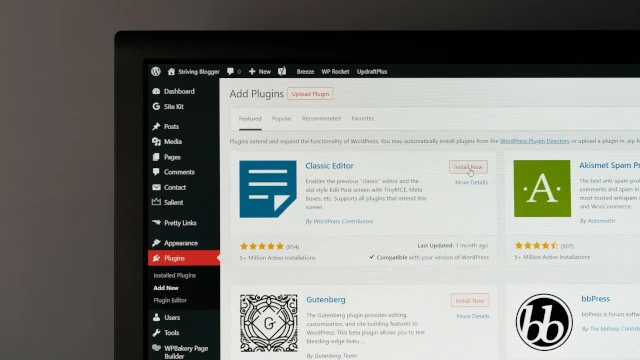
There are many website builder tools out there to choose from. Most will provide additional features like AI tools to help build your website and content, eCommerce solutions if you want to sell products, and marketing tools like email newsletters to grow your audience.
If you're unsure, start with Wix or Squarespace - you can always switch later once you're comfortable.
Step 3: Choose a template that fits your style
All website builders come with templates - pre-designed layouts you can customise with your own content.
Look for a simple, clean design with space for photos and clear calls to action. Don't worry too much about colour or font choices yet; focus on structure first.
A good dog walking website template should include:
- A large hero image (ideally you or a dog photo)
- A clear intro section about you and your business
- Space for testimonials and client reviews
- Information about your services and pricing
- Contact information or booking form
Most builders let you preview templates. Choose one you like and click “Use Template.” Boom - you're halfway done.
Step 4: Add your key information
Now it's time to make it yours. Replace all the placeholder text and images with your real content.
Here's a checklist of what to include:
- Your business name and tagline
- About you - A short, personal paragraph explaining who you are, your experience, licenses and certifications, and why you love what you do. People hire you as much as your service.
- Services and prices - List each service clearly - e.g., 60 minute solo walk, group walk, pet visits - and include starting prices. Be clear so that customers know what they're getting. Transparency builds trust.
- Areas you cover - Mention towns or postcodes so Google can help local people find you.
- Testimonials - If you've got happy clients, include their quotes or reviews. Even one or two make a big difference. Social proof shows customers you can be trusted with other peoples pets. Link to your Google business profile to show your full list of verified reviews.
- Contact details - Add a phone number, email, however you want people to contact you. Ideally include a contact form so people can contact your there-and-then whilst they're a captive audience. Also include links to any social media profiles so customers can see what you get up to day-to-day.
Step 5: Choose a domain name
A domain is your website's address (like www.leadrapp.co.uk). It's what clients will type into their browser to find you.
A few tips:
- Keep it short, easy to remember, and reflective of your brand/business.
- Avoid hyphens or complicated spellings. Does it pass the radio test? If you can say it out loud and people can spell it, you're golden.
- You can buy a domain directly through most site builders (~£10/year).
Once connected, you'll have a proper business URL that looks professional in search results, on business cards and social media.
Step 6: Add a personal touch with images
Don't underestimate how much good photos boost trust.
Use:
- Real photos of you with dogs on walks, if you have them. People like to see the face behind the business and further builds trust
- Your logo (if you have one)
- Local scenery/routes where you walk your dogs (parks, fields, or recognisable areas). Especially useful if you offer services like adventure walks or paddocks so customers can see what their dogs will get up to
If you don't have your own, you can use free commercial photos from Unsplash (opens in a new window) or Pexels (opens in a new window). Just make sure they look natural, genuine and reflective of your business, not cheesy stock images.
Step 7: Make it easy for Google to find you
Even a one-page site can appear on Google if you include a few local-friendly details:
- Mention your town or area to help people searching for "dog walker near me"
- Add your business name and phone number in the footer
- Submit your site to Google Business Profile (it's free)
You can also link to your social pages - the more connected your online presence is, the better Google understands who you are and how you can help local dog owners.

Step 8: Publish and share!
Once you're happy, hit Publish. Then share your link. Make a big deal about it:
- Post about it to all your social media
- Add it to your Facebook and Instagram bios
- Send it to existing clients
- Print it on your business cards and flyers
Congratulations - you've now got a professional, trustworthy, online presence for your business, all set up in less time than it takes to walk a dog!
Optional extras for later
Once your basic site is live, you can start adding simple upgrades over time:
- Blog posts - share dog walking tips or updates. Keeping your website updated regularly with fresh content is great for SEO
- Online booking - integrate a booking form or software like Leadr so customers landing on your website can see your services, availability and book directly
- Email signup - offer a free resource or tips in exchange for emails, great for building a customer base
- Shop - sell accessories, treats, or branded merch
- Photo gallery - showcase your walks and happy clients
Remember: the goal isn't perfection - it's presence and progress. Even a simple site that works today is far more valuable than a “perfect” one that never gets launched.
The bottom line
Creating your dog walking website doesn't need to be a huge project. With modern tools, you can have a clean, professional site up in under an hour - no coding, no stress.
Your website helps people find you, trust you, and book you. It's one of the easiest, lowest-cost investments you can make in your business - and it works for you 24/7, even when you're out walking dogs.
So grab your laptop (or even your phone), pick a template, and get started. By this time tomorrow, you could have a live website that makes your business look every bit as professional as the service you provide.
If you found this useful, find out how Leadr can help your business.
Start for freeGet more tips in your inbox
Subscribe to our newsletter for practical guides and advice to help you grow your dog walking business.
Related posts

26 June 2026
Dog walking pricing guide: How much should you charge?
Not sure what to charge for dog walking? Learn how to calculate profitable rates, cover your costs, avoid common pricing mistakes, and attract the right clients for your business.
22 September 2025
Do dog walkers need a website? (Spoiler: Yes)
Many dog walkers wonder if they need a website. The short answer? Absolutely. A website helps you get found on Google, build trust, and look professional - without being expensive or complicated. Here's why a website should be at the heart of your dog walking business.